
PDF documents can be exported using many different settings depending on the desired output device: Laser Printer, Wide Format Printer, or Web Viewing.
When do I choose PDF export settings? It depends on the program but usually after choosing the filename, type, and location to save a popup menu will appear where PDF settings can be chosen
Wide Format Inkjet Printing
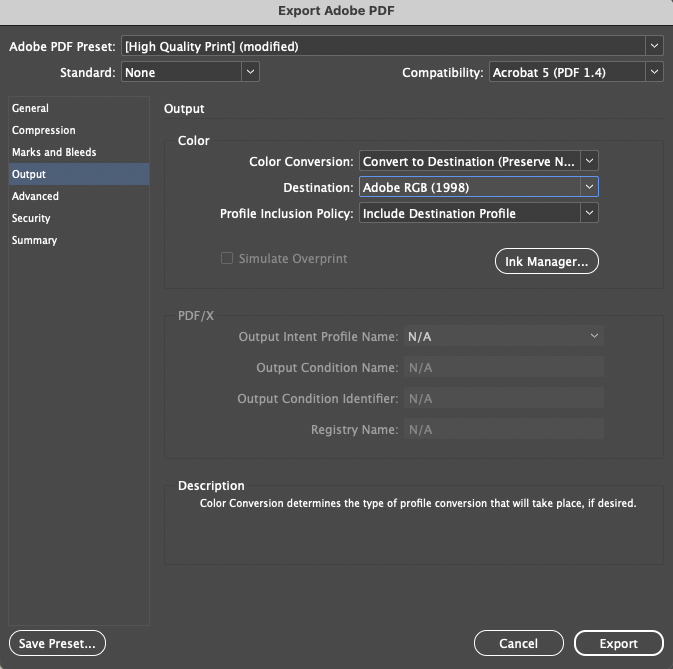
—> We recommend using the High Quality Print Preset preset when you intend to use the Wide Format Printers.
Under the Output tab, Change to ‘Convert to Destination (Preserve Numbers)’, Destination to ‘Adobe RGB (1998)’. & Profile Inclusion Policy to ‘Include Destination Profile’
Laser Printing
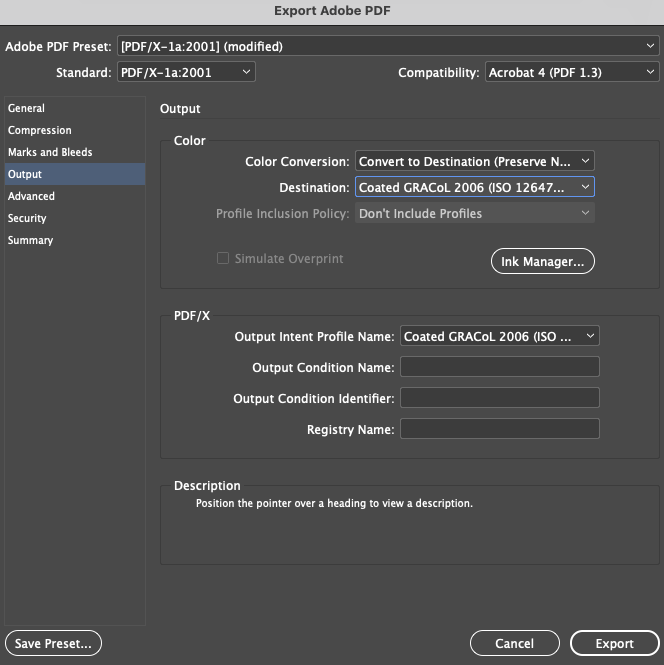
—> We recommend using the PDF/X1a:2001 preset when you intend to use the Laser printer.

Recommended Changes to Settings
Marks & Bleed: Only include crop & bleed marks if the file setup for that item/product requires it (For card printing we do not want any marks). Click ‘Use Document Bleed Settings’ to include previously setup bleed, usually should be set to 0.125″(1/8″). If you want us to cut your prints you must include bleed area and crop marks.

Output Color Conversion: Change to ‘Convert to Destination (Preserve Numbers) & choose the Destination to ‘Coated GRACoL 2006’