

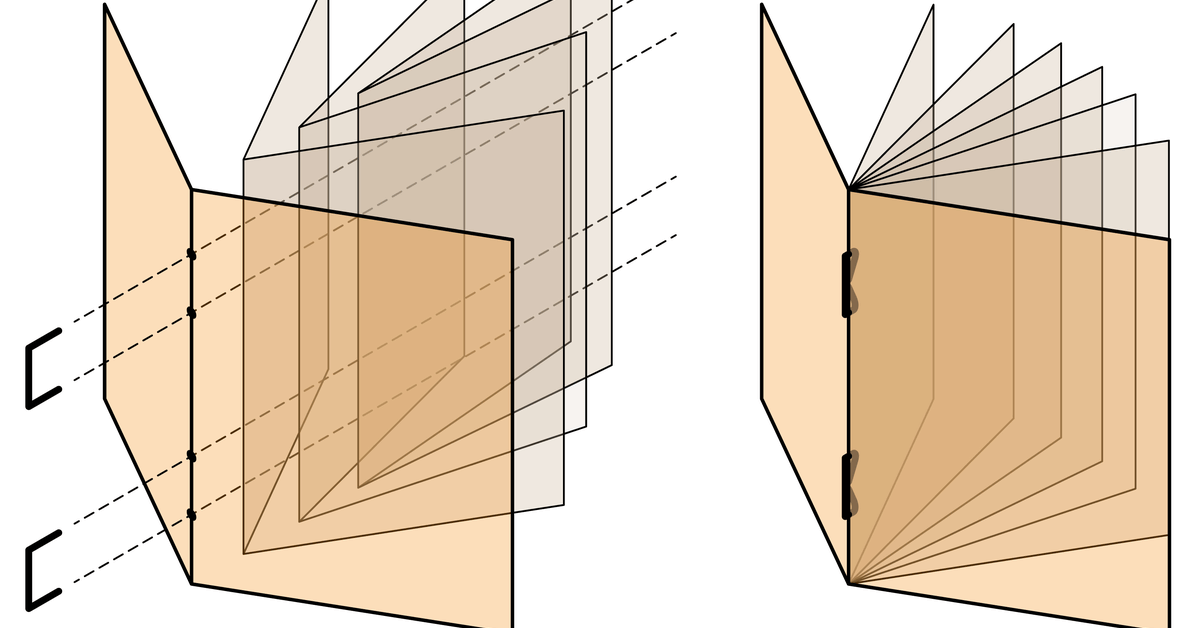
 Saddle Stitch books are made by folding standard sheet sizes in half, the folded sheets are stapled twice with a wire staple. Each folded sheet has 4 places for book pages – your final page count must be a multiple of 4. Works best with between 8 pages and 60 pages, more pages are possible but thinner paper must be used and spine gets more rounded, page creep can become very pronounced. We are able to do large quantities of saddle stitch books, most orders are ready within 2 days.
We offer both No-Bleed (edges of design are cut off by printer margin, printed on standard sheet sizes, no cutting) and Full-Bleed/Borderless (printed on larger sheet sizes and trimmed down after printing so the design is borderless/goes to the edge of the sheet). When submitting your order online you will be able to select different papers for the body and cover.
The file setup and export processes are different for each book type – See Full-Bleed vs No-Bleed below. Detailed file setup and exporting instructions are available in our How to Booklet for Saddle Stitch Books.
PRO’s & CON’s OF SADDLE STITCH BOOKS
Pros:
-
- Inexpensive: B&W No-Bleed Saddle Stitch books are among the least expensive binding options. You can have us print the cover in color and the interior of the book in B&W (must select when ordering in Digital Storefront).
- Lays Flat: Unlike perfect bound binding, saddle stitched documents lay flat when opened so your design is not lost in the spine gutter.
-
- Quick To Make: The turnaround time for saddle-stitched materials is very fast because there is no glue heating and drying process involved. Most orders are ready within 2 days.
- Large orders available: Unlike perfect binding, we are able to do large orders of saddle stitch books. Turnaround time depends on current workload and order size.
Cons:
-
- More Work To Setup: Full-bleed books require bleed area to be added in your file and the export process is more complicated.
- Less Sturdy: Heavy use can cause paper to tear away from the staples.
- Limited Page Count: Recommended page count is 8-60 pages. Maximum page count is 100 pages but must use thinnest paper and the spine gets very rounded.
- Lower Quality Look: While a brochure may look stunning, saddle stitch binding will keep it looking like a brochure or magazine. It is designed to be a less expensive bind typically for time-sensitive material. Books can be ordered ‘Folded not Stapled’ which allows you bind them yourself with nicer staples, sew the pages, or do other binding techniques.
FULL BLEED vs. NO BLEED

All books are printed on the Laser printers which have a roughly 0.125-0.2″ white margin around the edge of the paper where nothing will print. No-Bleed books are the easiest to setup and are cheaper. Borderless/full-bleed printing where the design goes to the edge or custom sized books require adding bleed area to your file and a more complicated saving process and may cost more to print on a larger sheet size.
No Bleed Booklets – Standard Size Sheets, No Cutting, 0.2″ Margin
No-Bleed Books are printed on standard sheet sizes. No cutting is available, any design on the outside 0.125-0.2″ edge of the file will get cut off. We recommend adding a white border in the design and keeping important text/designs at least 0.25″ from the edge otherwise the edges of your design may get cut off. You can also select ‘Fit to Media’ when selecting the Media type and we will shrink or enlarge your file to fit the printable area so nothing is cut off.
- Your file should be setup in the order you intend it to be read with a digital page for every page of the final book, including blank pages and all covers. If you book has 12 pages the file should have 12 pages as well.
- The page size should be set to the size of a single page of the book, available sizes are 5.5×8.5″, 8.5×11″, 9×12, or 9.5×13″
- Page count must be a multiple of 4
- Keep important design or text at least 0.25″ away from edge or it may get cut off during printing
- Vertical/Portrait orientation only
- Save as PDF file format
Full Bleed Booklet – Borderless Booklets or Non Standard Sizes
Full-Bleed/Borderless Books are made by adding bleed area (extra design that extends past the page edge/crop marks – 0.125″ on all sides) in your file, exporting your file using the Print Booklet process to add crop marks and impose the file, printing on the next larger sheet size, the books are then cut to the crop marks. The design will be borderless and go to the edge of the page.
- If your booklet will be borderless or you want it to be a specific size (different from standard No-Bleed Sizes) then you will need to do use the full-bleed book process.
- Adobe InDesign is recommend, other programs may work but they must be able to add bleed, crop marks, and impose the file for printing
- Bleed is extra design or image that extends outside of the final page area, we recommend to have 0.125″ on each side of the page. See our page on Borders and Bleeds to learn more about setting up InDesign for bleeds.
- Instead of File>Export, you will use the File>Print Booklet process to save the file and prepare it to be submitted on our website.
- You must download and install the Service Bureau Print Driver to complete this process (not available for PC users – we offer several computers outside of our lab area that have it preloaded)
- File should be imposed with crop marks and bleed area visible, the Print Booklet process will prepare the book so 2 pages of the design on on each page of the digital file with bleed area extending past the first set of crop marks. File is first saved out of InDesign as a Postscript file (.ps) which is then converted to a PDF using Adobe Distiller (you must download Adobe Acrobat to get Distiller), see the Print Booklet process walk thru for full details.
FILE SETUP GUIDELINES
Recommended Software Programs
-
- No Bleed Designs can be made in almost any program but Adobe Illustrator or Adobe InDesign are recommended. It’s best to set up the exact size you want the file to be printed (printer cannot print to the edge of the page). If the page size is not set to the desired final page size you can select ‘Fit To Print’ when selecting the media to enlarge or shrink the design during printing.
- Full-Bleed Designs – Adobe InDesign (recommended) or Illustrator must be used: File must have crop marks and bleed area if full-bleed/borderless is desired.
Your file should be setup in the order you intend it to be read with a digital page for every page of the final book, including blank pages and covers (page 1 is the cover, page 2 is the inside cover, page 7 is the inside back cover, page 8 is the back cover). Imposition (ordering pages for printing) happens during the export process for Full-Bleed books and during the printing process for No-Bleed books. The covers should be included in your page count, not a separate file. The front and back covers should be on their own as single pages in InDesign while the interior pages will appear as spreads. The ‘Facing Pages’ option should be checked in your Document Setup.
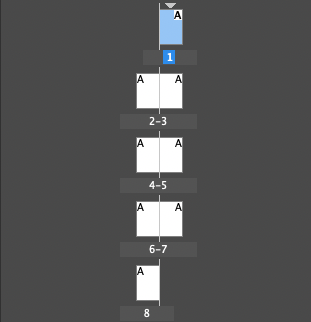
Total page count (including the covers) must be a multiple of 4 (4, 8, 12, 16, 20, 24, 28, 32, etc.) because each folded sheet creates 4 pages. If your page count is not a multiple of 4 the blank pages will be added at the end which can throw off your design.We will not adjust files that are submitted incorrectly.

Set the page size digitally to the size of a single final page. No-Bleed Sizes: 5.5″x 8.5″, 8.5″x 11″, 9×12″, and 9.5×13″. Full-Bleed Sizes: Any size* up to 9×12″ – books smaller than 5.75″ tall cannot be cut & stapled (staples are 5.5″ apart, centered so they would interfere with the cutting. You can order the books ‘Folded Not Stapled’, the Service Bureau can check out a saddle stapler so you can manually staple the books and bring them back for cutting).
You can designate a thicker paper for the cover if desired. When ordering on the Digital Storefront you must make a selection for both the Interior and Covers of the book even if you want the same paper for both so the price is calculated correctly. Your order may be cancelled if both selections are not made for both. Vellum, Transparency, and Risograph only papers cannot be used. Paper samples are available outside the Service Bureau (Sharp 1111). Available papers will say ‘Laser printing’ on the sample.
Due to the nature of color laser printing, colors will shift throughout the day and from day to day. We are unable to exactly match prints made at separate times. Not all visible elements are able to be printed, some vibrant colors and gradients are not able to be rendered well. Using the recommended PDF export settings & color profile (CMYK – Coated Gracol 2006) will help get the closet possible print.

Order Submission & Turnaround
- Turnaround is 48 hours. There are no Rush option, orders may be done sooner but it is not guaranteed. Large orders may take longer.
- We do not do “proofs” before running larger jobs. If you are running a large job and want to see a proof, submit a job for only 1 copy of your document. Once you are satisfied with the outcome you will then turn in the final order for the number of copies you want.
- Books can be ordered ‘Folded Not Stapled’ if you want to staple or sew the books yourself (we can checkout a saddle stitch stapler)
- Max recommended page count is 60 pages. Depending on number of pages in the booklet, the paper choices for the cover and interior pages you may find that the booklet is unable to be stapled or close when laying on the table.
Take a look a the Submission Guidelines for specifics about ordering through the Digital Storefront.